CS-Cart Block.io Bitcoin Wallet:
Now allow your customers to pay via Bitcoins on your store and make their checkout experience quite fast and secure. CS-Cart Block.io Bitcoin Wallet add-on integrates block.io with CS-Cart. This allows store admin to enable bitcoin payment at his store. It also lets you have a greater control over the checkout experience so that you can test and implement the most effective experience for your store. It is one of the most reliable and secure payment solutions and monitors the transactions in real time.
Features
- Well integrated with CS-Cart Multi-Vendor.
- Integrates with block.io, the most versatile and secure wallet for bitcoins.
- Admin can enable bitcoin payment at his store.
- Functionality to generate bitcoin address for the user.
- The user can request for Bitcoin wallet/address from the profile page while registering at CS-Cart store.
- Functionality to generate a bitcoin address for the user who does not have one during payment.
- Easy to configure and manage at admin end.
How To Upload and Install
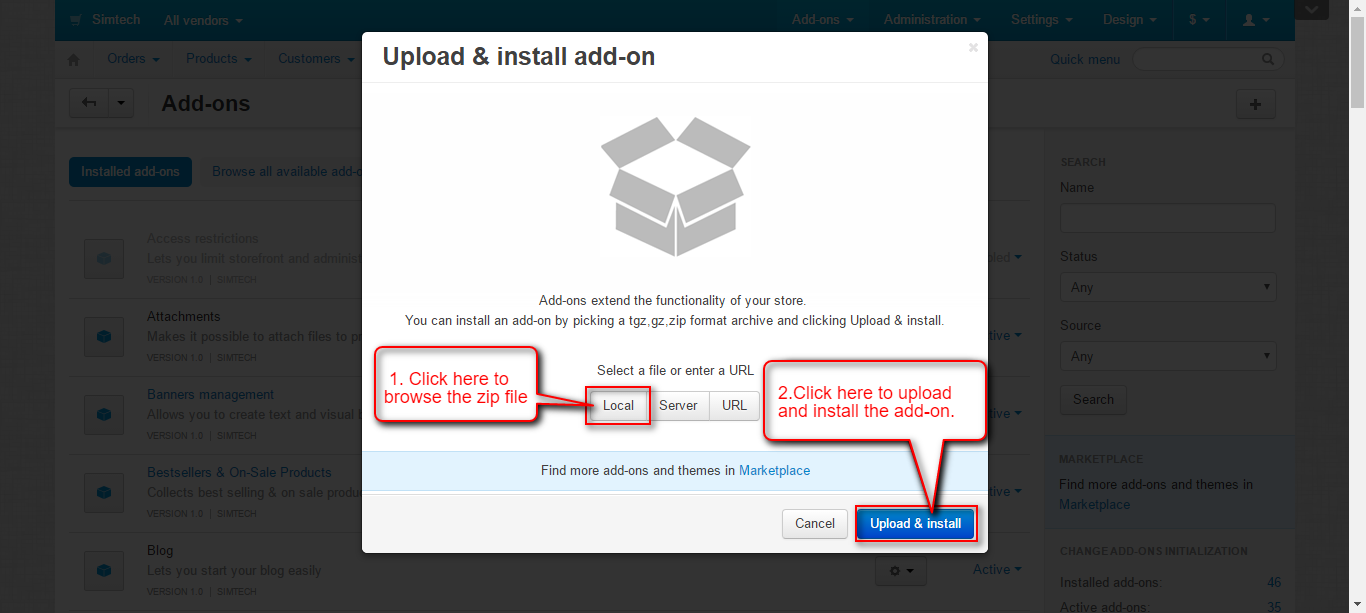
Go to “Manage add-ons”, click on “+” to upload and install the zip file as shown below.

Click on “Local” to browse the zip file and then click on “Upload & Install” as shown below in snapshot.
Configuration

Enter the Block API key and Block API Pin & Save the settings.

Back End View
Go to “Administration” tab and click on “Payment methods”.

Click on “+” to create a new payment method.

Set the parameters as shown below in the snapshot.
- Set the name of the payment method.
- For checkout choose the processor as “Block.io Payment”.
- Select template as “cc_outside.tpl” from the dropdown.
- Configure the tabs accordingly as shown below in the snapshot.

Click on “Configure” and set the parameters as shown below in the snapshot.
- Enter the Bitcoin Wallet Address of Admin where the order amount is received.
- Enter the Exchange rate.
- Set the order status which needs to be updated on successful bitcoin payment.
- Save the settings.

Front End View
Once the payment method is configured, option for payment via Bitcoin is available for customers at the front end. For payment, customer needs to select the option as shown below in the snapshot and enter the necessary details for payment.

If the customer does not have Bitcoin wallet Address, it gets created automatically. Also, the user can request for a bitcoin wallet address while registering on your store as shown below.

The user can check bitcoin address under his profile details at the front end as shown below.

A separate tab, Block.io gets created and Bitcoin address is mentioned under that tab.

Back End View
Store admin can view the Bitcoin address of the customer in Customer Profile page at backend.
Go to Customers -> Customers and open the profile page of the customer. Click on Add-ons to view the bitcoin address of that customer.

Support
This is all about CS-Cart Block.io Bitcoin Wallet. Still have any issue, feel free to contact us at http://webkul.uvdesk.com and let us know your views to make the module better.