Create Dynamic Mass Action In Magento2 Grid : if you want to create dynamic mass action in any custom grid of magento2, to achieve this you have to follow some steps .
1. Write mass action code in your ui component phtml file
<massaction name="listing_massaction">
    <argument name="data" xsi:type="array">
        <item name="config" xsi:type="array">
            <item name="selectProvider" xsi:type="string">dynamicmassaction_massaction_listing.dynamicmassaction_massaction_listing.dynamicmassaction_massaction_columns.ids</item>
            <item name="component" xsi:type="string">Magento_Ui/js/grid/tree-massactions</item>
            <item name="indexField" xsi:type="string">entity_id</item>
        </item>
    </argument>
    <action name="assign_badge">
        <argument name="data" xsi:type="array">
            <item name="config" xsi:type="array">
                <item name="type" xsi:type="string">assign_badge</item>
                <item name="label" xsi:type="string" translate="true">Assign badge</item>
            </item>
        </argument>
        <argument name="actions" xsi:type="configurableObject">
            <argument name="class" xsi:type="string">Webkul\DynamicMassaction\Ui\Component\MassAction\Badge\Assignoptions</argument>
            <argument name="data" xsi:type="array">
                <item name="urlPath" xsi:type="string">dynamicmassaction/managemassaction/massAssignBadge</item>
                <item name="paramName" xsi:type="string">entity_id</item>
                <item name="confirm" xsi:type="array">
                    <item name="title" xsi:type="string" translate="true">Assign badge</item>
                    <item name="message" xsi:type="string" translate="true">Are you sure to assign selected badge to customer?</item>
                </item>
            </argument>
        </argument>
    </action>
</massaction>
Lets take chunk of the above code for better understanding
<argument name="actions" xsi:type="configurableObject">
    <argument name="class" xsi:type="string">Webkul\DynamicMassaction\Ui\Component\MassAction\Badge\Assignoptions</argument>
    <argument name="data" xsi:type="array">
        <item name="urlPath" xsi:type="string">dynamicmassaction/managemassaction/massAssignBadge</item>
        <item name="paramName" xsi:type="string">entity_id</item>
        <item name="confirm" xsi:type="array">
            <item name="title" xsi:type="string" translate="true">Assign badge</item>
            <item name="message" xsi:type="string" translate="true">Are you sure to assign selected badge to customer?</item>
        </item>
    </argument>
</argument>

here you will see a line, where you have to set the path for manipulation of dynamic massaction
<argument name="class" xsi:type="string">Webkul\DynamicMassaction\Ui\Component\MassAction\Badge\Assignoptions</argument>
    <argument name="data" xsi:type="array">
2. in this path Webkul\DynamicMassaction\Ui\Component\MassAction\Badge\Assignoptions you need to manipulate your massaction
<?php

namespace Webkul\DynamicMassaction\Ui\Component\MassAction\Badge;

use Magento\Framework\UrlInterface;
use Zend\Stdlib\JsonSerializable;
use Webkul\DynamicMassaction\Model\ResourceModel\Badge\CollectionFactory;

/**
 * Class Options
 */
class Assignoptions implements JsonSerializable
{
    /**
     * @var array
     */
    protected $options;

    /**
     * @var CollectionFactory
     */
    protected $collectionFactory;

    /**
     * Additional options params
     *
     * @var array
     */
    protected $data;

    /**
     * @var UrlInterface
     */
    protected $urlBuilder;

    /**
     * Base URL for subactions
     *
     * @var string
     */
    protected $urlPath;

    /**
     * Param name for subactions
     *
     * @var string
     */
    protected $paramName;

    /**
     * Additional params for subactions
     *
     * @var array
     */
    protected $additionalData = [];

    /**
     * Constructor
     *
     * @param CollectionFactory $collectionFactory
     * @param UrlInterface $urlBuilder
     * @param array $data
     */
    public function __construct(
        CollectionFactory $collectionFactory,
        UrlInterface $urlBuilder,
        array $data = []
    ) {
        $this->collectionFactory = $collectionFactory;
        $this->data = $data;
        $this->urlBuilder = $urlBuilder;
    }

    /**
     * Get action options
     *
     * @return array
     */
    public function jsonSerialize()
    {
        $i=0;
        if ($this->options === null) {
            // get the massaction data from the database table
            $badgeColl = $this->collectionFactory->create()->addFieldToFilter('status',['eq'=>1]);

            if(!count($badgeColl)){
                return $this->options;
            }
            //make a array of massaction
            foreach ($badgeColl as $key => $badge) {
                $options[$i]['value']=$badge->getEntityId();
                $options[$i]['label']=$badge->getBadgeName();
                $i++;
            }
            $this->prepareData();
            foreach ($options as $optionCode) {
                $this->options[$optionCode['value']] = [
                    'type' => 'badge_' . $optionCode['value'],
                    'label' => $optionCode['label'],
                ];

                if ($this->urlPath && $this->paramName) {
                    $this->options[$optionCode['value']]['url'] = $this->urlBuilder->getUrl(
                        $this->urlPath,
                        [$this->paramName => $optionCode['value']]
                    );
                }

                $this->options[$optionCode['value']] = array_merge_recursive(
                    $this->options[$optionCode['value']],
                    $this->additionalData
                );
            }

            // return the massaction data
            $this->options = array_values($this->options);
        }
        return $this->options;
    }

    /**
     * Prepare addition data for subactions
     *
     * @return void
     */
    protected function prepareData()
    {

        foreach ($this->data as $key => $value) {
            switch ($key) {
                case 'urlPath':
                    $this->urlPath = $value;
                    break;
                case 'paramName':
                    $this->paramName = $value;
                    break;
                default:
                    $this->additionalData[$key] = $value;
                    break;
            }
        }
    }
}
3. Now you will see your dynamically added mass actions are displaying on grid.
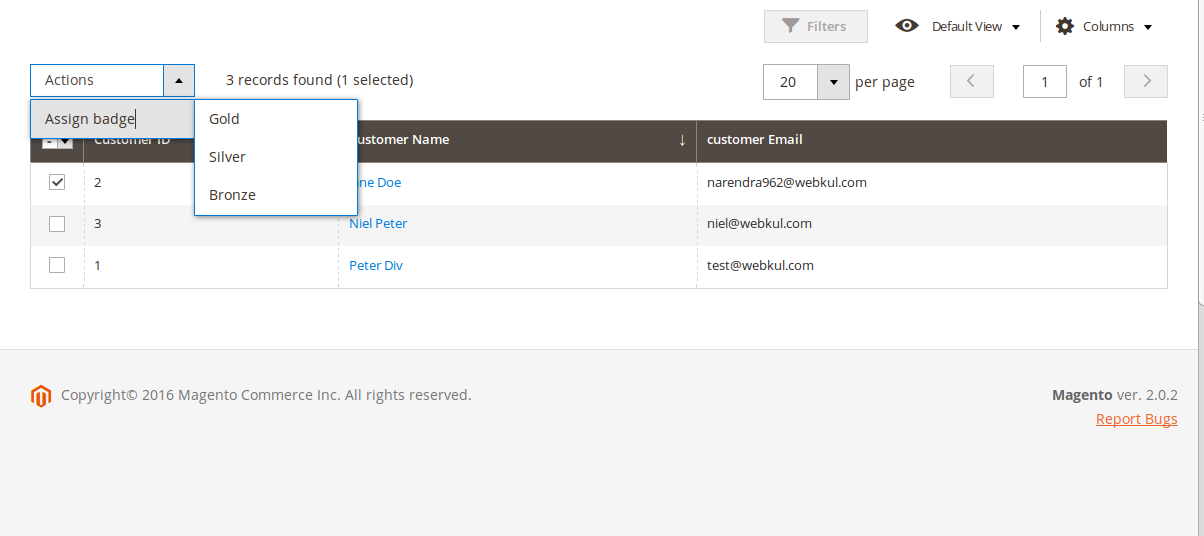
So in this way, you can add dynamic massaction in your grid.Hope this blog will help you.